
Streamlining Procurement: The Complete Guide to the Bay Boss + PartsTech Integration
In a high-volume repair shop, efficiency isn’t just a metric—it’s the difference between a profitable week and a chaotic one. One of the most common “profit leaks” in the industry is the manual entry of parts data.
Bay Boss is proud to announce its official integration with PartsTech, a move designed to eliminate data silos and accelerate the transition from “Parts Quote” to “Work Order.”
The Challenge: The Data Entry Gap
Most shop management workflows are interrupted when it’s time to source parts. Service writers often leave their management software, open a separate browser tab, find the parts, and then manually transcribe part numbers, descriptions, and costs back into the system.
This “Data Entry Gap” introduces two risks:
Time Loss: Cumulative minutes spent re-typing data can add up to hours of lost productivity per week.
Human Error: A single transposed digit in a part number can lead to incorrect ordering, shipping delays, and bay downtime.
The Solution: The Integrated Punchout
The Bay Boss + PartsTech integration creates a seamless loop between your shop management and your parts suppliers. Here is a step-by-step look at how this integration optimizes your workflow.
Configuration and Setup
Activating the integration is a one-time process. Within the Bay Boss Integrations dashboard, Shop Owners who already have a PartsTech account, can use your login credentials. If you don’t have a PartsTech account, signing up is a simple process we walk you through right in Bay Boss.
Once your account is linked, the “Find Parts” feature is instantly available for all users in your Shop through the Work Order.
1. Launching the Session
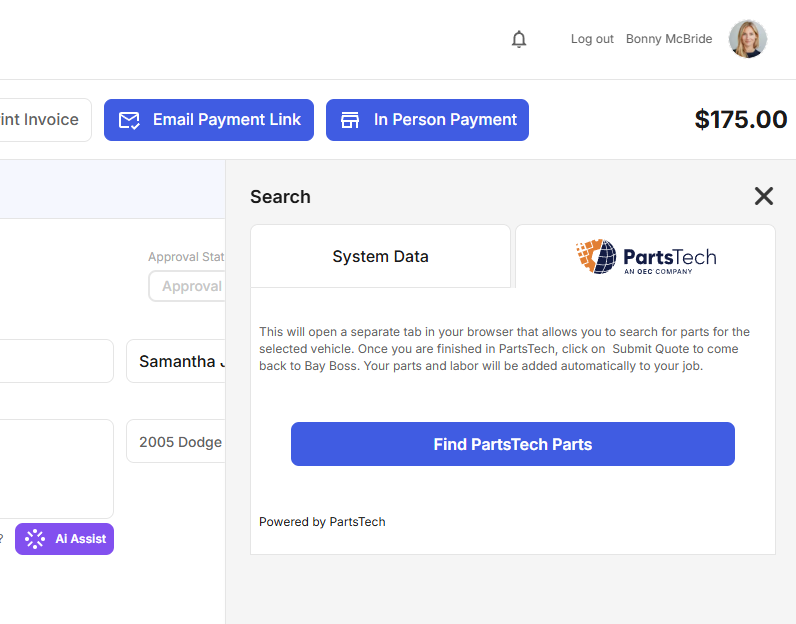
- From any active Work Order in Bay Boss, users can launch a PartsTech session with a single click. There is no need to log in to a separate portal; Bay Boss handles the secure authentication in the background.
2. Real-Time Sourcing
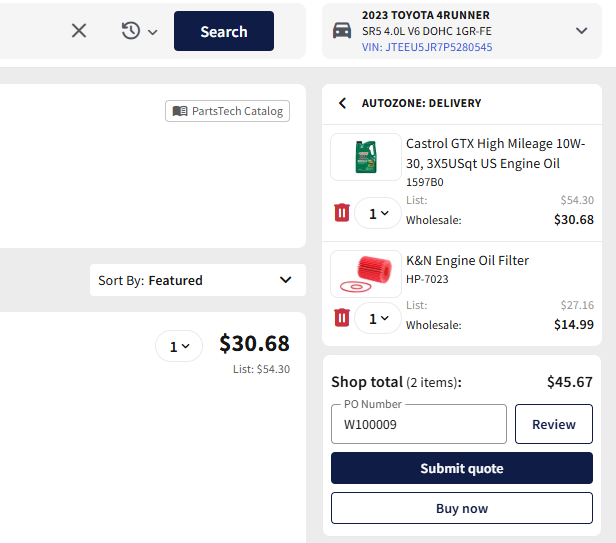
Once inside the PartsTech interface, you have access to your existing network of local and national vendors. You can compare real-time pricing and availability just as you always have, ensuring you’re getting the best margin on every job.
3. Instant Data Synchronization
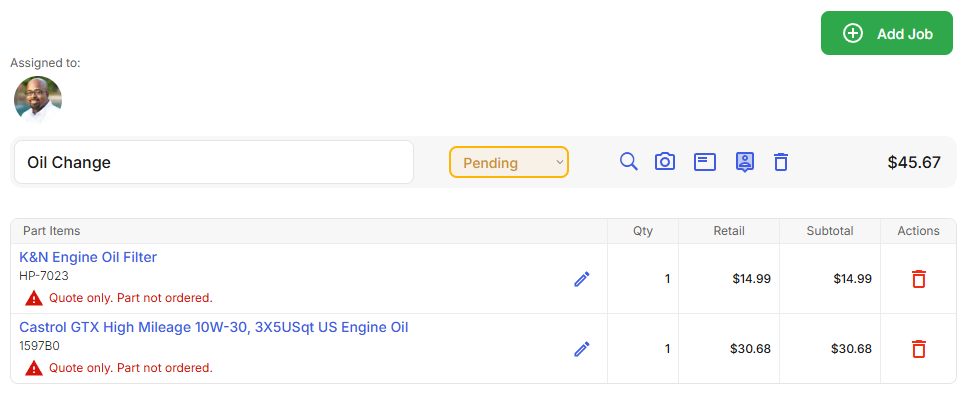
The “Magic Moment” occurs when you submit your quote. Instead of downloading a PDF or copying text, clicking Submit Quote triggers an automated data transfer.
Part Numbers: Transferred exactly as listed.
Descriptions: Populated directly into the Work Order.
Cost & Retail: Mapped to your specific pricing tiers.
4. Multiple Parts Procurement Methods
The PartsTech integration in Bay Boss supports both Quotes and Ordering.
Quotes: The selected items are synced with your Work Order but not ordered from PartsTech. They can be ordered from within Bay Boss when approval has been received. Additionally, stock availability can also be checked before ordering previously quoted parts.
Orders: Just like with quotes, selected parts come back directly into your Work Order, but they are also ordered from PartsTech at the time the user clicks the “Order” button within PartsTech.
Professional Benefits for Your Shop
Beyond just “saving time,” this integration strengthens the operational integrity of your business:
Accurate Inventory Tracking: By pulling exact part numbers, your inventory records remain clean and searchable.
Consistent Profit Margins: Automated price mapping ensures that your markup rules are applied consistently to every part brought in from the catalog.
Seamless Accounting: Because the data is accurate at the point of entry, it remains accurate all the way through to Bay Boss’s integration with your QuickBooks reconciliation.
How to Get Started
If you’re a current Bay Boss user, you can connect your PartsTech account in the Integrations tab right now.
Not using Bay Boss yet? [Click here to schedule a free demo to see if Bay Boss is right for your Shop]
